Rich Media in Blog Posts

Rich Media in Blog Posts
Prometheus blog supports a wide range of embedded media. This article demonstrates each type and how it renders within the content area.
Raster Photography
Standard photographs and raster images are automatically optimized by Astro — converted to modern formats (AVIF, WebP) and served in multiple sizes for responsive loading.

Raster images work well for photographs, screenshots, and any content with complex color gradients. Astro processes them at build time, so there is zero runtime overhead.
Vector Graphics
SVG images are ideal for diagrams, icons, and technical illustrations. They scale to any size without losing quality and have tiny file sizes.
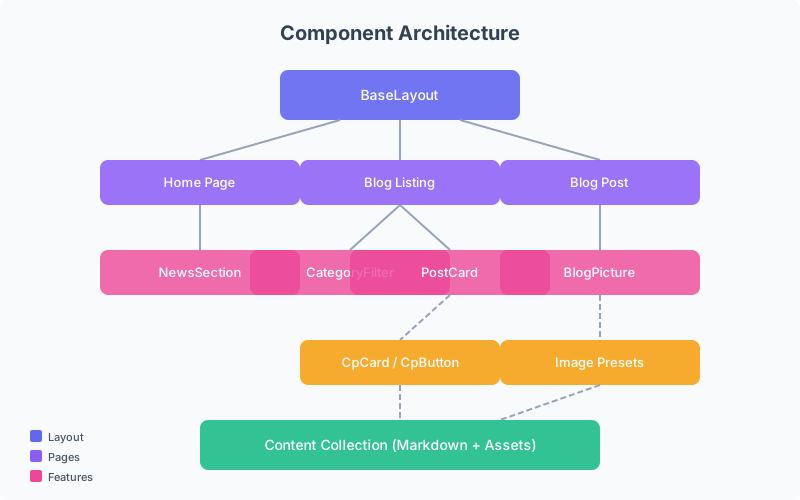
Vector images are particularly useful for:
- Architecture diagrams — like the one above
- Flowcharts and decision trees
- Icons and brand assets
- Data visualizations and charts
Video
Embedded video allows for tutorials, demos, and visual storytelling. The player supports standard controls — play, pause, volume, fullscreen.
Video files are stored in the article’s assets/ folder and served automatically at build time. For production use, consider a CDN or adaptive streaming for larger files.
Audio
Audio embeds are useful for podcasts, music samples, or narration. The native browser player provides playback controls.
Audio files follow the same strategy as video — stored in assets/ and resolved at build time.
Media Best Practices
When adding media to articles, keep these guidelines in mind:
- Images: Place in the article’s
assets/folder — Astro optimizes them automatically - Vector graphics: Use SVG for diagrams and illustrations
- Video: Keep files small or use external hosting for longer content
- Audio: Provide captions or transcripts for accessibility
- Alt text: Always describe visual content for screen readers